Blog
Welcome


Recent posts
SEARCH RESULTS FOR: Photojunction Remix

You’ve heard the saying about fitting square pegs in round holes? It can be very apt when it comes to choosing images for our Photo Front covers, especially the 1/4 Photo Front, as this screen shot from PJ Remix indicates – only a slice from the image will fit on the cover. Although I’ve used Photojunction to illustrate the problem, it solves the problem as well. In Photojunction simply drag the image you want to use on to the cover layout, as in the screen shot. If it won’t fit the space you’ll soon know: you'll need to choose a different cover style or find an image with a suitable To View More >>
This entry was posted in by Admin

How do you know what size and shape to make an album cover image? How do you account for the aspect ratio and cover wrap-around (the part of the image you can't see)? If it sounds hard, it's not. Just design the cover in PJ Remix. It's exactly like designing pages only easier. You can see the aspect ratio and the wrap-around. And problems rarely occur because it's so obvious when images don't fit. We've already blogged about album covers, especially here and here, so we won't repeat ourselves. If you're not sure how to send us the image there's a link about that too. To View More >>
This entry was posted in by Admin
All software evolves as new features are added and new versions released. Photojunction and Photoshop are no exception, and, as PJ takes advantage of more, often newer, features of Photoshop, its "backwards compatibility" with older versions is lessened. That's why we recommend that you use Photoshop CS3 or later with Photojunction. If you use CS2 or even earlier, chances are that it will work fine, but you may occasionally find that some PSD files don't import correctly as images or templates, or that you get error messages when exporting with PS scripting. If that happens, all Support can do To View More >>
This entry was posted in by Admin
The purpose of our recent survey was to get a better picture of how you're using the software, and the features most important to you. It turns out you use Photojunction to design albums for almost a hundred album suppliers that we don't even offer resources for - no wonder a third of you "always" use Remix DIY! It's also clear that unless you're one of Queensberry's clients you're most likely using PJ primarily to design and export page layouts. That's not so surprising. Getting past "page design" requires a lot of input from vendors, and unfortunately they're much less engaged with PJ than their To View More >>
This entry was posted in by Admin
We emerged from last week's webinar with six new classroom movies. Not bad for an hours work! Here they are, posted to our Vimeo channel. - Start here! (Photojunction overview) - Download and set up Photojunction - Start New Project (begin an album) - Set up the work space (to suit your computer) - Organise your images (using the Event window) - Design an album (getting started) This week we aim to cover another five or six topics. You'll find all the details on our webinar schedule here. I know you Photojunction experts are hankering for the advanced classroom movies... At this rate, we'll be To View More >>
This entry was posted in by Admin
It's been a little while since we last updated our popular Intro to Photojunction webinar recording on our Vimeo channel. It's had thousands of views, but with so many new changes to the software since it went up earlier this year, a newer version was due. So we recorded last week's session and it's now available to view online, anytime... Watch it full screen (and in HD) here. Remember, if you'd like to join one of our live weekly webinars, check out our webinar schedule for details. We'd love you to join us. Cheers, Nigel To View More >>
This entry was posted in by Admin
As the new month rolls over (can you believe it's August already!), so does our webinar schedule. The August schedule will be online shortly, but in the meantime, here's the details about tomorrow's webinar: Intro to Photojunction @ 9am (NZT) In this webinar Danny will show you how to fire up the software and start using it. He'll also walk you through everything from registering, to designing an album, to exporting and sending. It's free to all so come along, listen, learn and ask questions. We'd love you to join us. Remember that's 9am NZT. Here are tomorrow's times for the rest of the world... To View More >>
This entry was posted in by Admin

Jerry Tomko is a long time friend who comes to mind whenever we think of heavy Photojunction users. He designs and sells a huge number of albums each year and has been using the software for as long as we can remember. 1) What impact does Photojunction have on your album design workflow? Photojunction has had a huge impact on my album design workflow. I have always been a firm believer in predesign - and in wedding albums, and I truly believe you should be able to see what you are purchasing. Even back in the film days, I would always present to the client what the album would look like before To View More >>
This entry was posted in Uncategorized by Admin
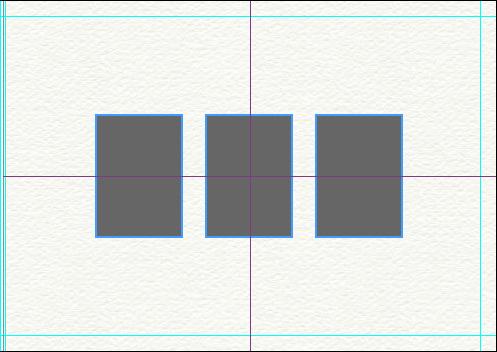
A couple of changes have been made to the way templates operate, making them even smarter than they already were. Here's the low-down... 1) When dropping a template onto a layout, Photojunction no longer Groups the apertures, which should make templates easier to understand for any users who haven't come to terms with Groups yet. Photojunction automatically scales and centers the template on the layout for you. That'll make editing a whole lot quicker and easier. 2) When using a Queensberry Duo template, Photojunction remembers which apertures were Matted and which were Digital. As with all templates, To View More >>
This entry was posted in by Admin
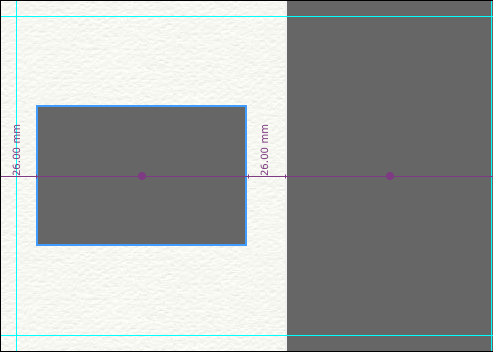
We introduced Smart Centering in release 1.32, and you told us you loved it. So in 1.39b, we've made Smart Centering a whole lot smarter. Photojunction now Smart Centers apertures in the remaining available space on a layout. Here's an example of a split mat (Fill Full Height or Fill Full Width) aperture layout. The smaller of the two apertures has been centered in the remaining available space on the mat, as the measurements and purple alignment line indicates. You can also hover your mouse over the 'Align to page centre' button in the Tools window to find the center of the remaining available To View More >>
This entry was posted in by Admin